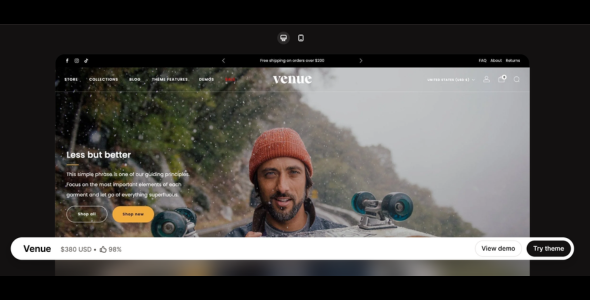
Venue Shopify Theme is a clean, modern, and promotion-focused premium Shopify theme designed for brands that regularly run campaigns, highlight collections, and showcase featured products. Built with flexible layouts and strong merchandising tools, Venue is ideal for fashion, accessories, lifestyle, beauty, and boutique eCommerce stores.
Venue is created for merchants who want a storefront that balances visual appeal with effective product promotion. Its layouts are structured to highlight seasonal sales, featured collections, and marketing campaigns while keeping navigation simple and intuitive.
Engineered for speed and usability, Venue uses optimized code to deliver fast loading speeds across desktop and mobile devices. The theme fully supports Shopify Online Store 3.0 (OS 3.0), allowing merchants to use sections on every page, app blocks, enhanced metafields, and advanced customization through the Shopify Theme Editor.
With multiple preset styles and flexible homepage sections, Venue adapts easily to different industries while maintaining a polished storefront that emphasizes promotional content and product visibility.
Built-In Promotional Tools Announcement bars, promotional banners, and featured marketing sections.
Countdown Timers & Urgency Features Encourage purchases during flash sales and limited-time promotions.
Mobile-First & Fully Responsive Design Optimized layouts for smartphones and tablets.
SEO-Friendly Structure Clean HTML markup and optimized performance improve search rankings.
Shopify Online Store 3.0 (OS 3.0) Support Sections on every page, flexible app blocks, and enhanced metafields.
Multilingual & Multi-Currency Support Ready for international Shopify stores.
Cross-Browser Compatibility Works smoothly across Chrome, Safari, Firefox, and Edge.
App Compatibility Seamlessly integrates with popular Shopify apps.
Documentation & Regular Updates Includes setup guides, customization instructions, and ongoing improvements.
Download Venue Shopify Theme
Venue Shopify Theme is a great choice for merchants who want a modern, promotion-focused Shopify store designed to highlight products and marketing campaigns effectively.
To get started:
Log in to your Shopify admin panel.
Go to Online Store > Themes.
Purchase or upload the Venue theme.
Publish the theme and customize it using the Shopify Theme Editor.
Build a modern and campaign-ready Shopify store with Venue Shopify Theme—perfect for brands that want strong promotions, flexible layouts, and a smooth shopping experience.