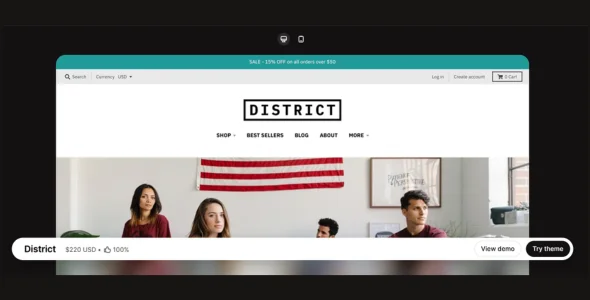
District is a premium Shopify theme designed for modern online stores that want a clean design, strong merchandising tools, and a conversion-focused shopping experience. Built specifically for growing eCommerce brands, District combines professional layouts with advanced product discovery features, making it ideal for fashion stores, lifestyle brands, electronics retailers, beauty businesses, home decor shops, and general online stores.
District is created for merchants who want to showcase large product catalogs while maintaining a smooth and intuitive shopping experience. Its flexible customization options, promotional features, and mobile-first design help businesses increase engagement, improve product visibility, and drive more sales.
Engineered for speed, usability, and scalability, District provides powerful collection management tools, promotional sections, advanced navigation features, and responsive layouts that adapt perfectly across all devices. Whether you’re launching a new store or scaling an established brand, District offers everything needed to create a professional Shopify storefront.
Customer Testimonials
Build trust with customer reviews and feedback sections.
Announcement Bar Support
Display important updates, promotions, and store announcements.
Blog Integration
Publish articles, buying guides, and content marketing posts.
SEO-Friendly Structure
Built with search engine optimization best practices.
Multi-Currency Support
Sell products internationally using multiple currencies.
Multi-Language Compatibility
Create localized shopping experiences for global customers.
Social Media Integration
Connect your store with popular social media platforms.
Responsive Design
Fully optimized for desktops, tablets, and smartphones.
Custom Content Sections
Add promotional content, images, videos, and banners throughout the website.
Advanced Typography Controls
Customize fonts and text styling to match your brand identity.
Regular Updates & Enhancements
Receive ongoing improvements, new features, and compatibility updates.
Professional Documentation & Support
Access detailed setup guides, tutorials, and dedicated customer support.
Download District Shopify Theme
District is an excellent choice for merchants who want a flexible, conversion-focused, and professionally designed Shopify theme. Its advanced merchandising tools, collection management features, and mobile-friendly design make it suitable for both small businesses and large online stores.
To get started:
Log in to your Shopify Admin dashboard.
Go to Online Store > Themes.
Click Upload Theme.
Upload the District Shopify Theme.zip file.
Click Customize to configure your store design.
Add products, collections, and promotional content.
Launch your online store.
Build a fast, professional, and sales-driven Shopify store with District Theme—the ideal solution for brands looking to grow their eCommerce business with a clean and modern shopping experience.