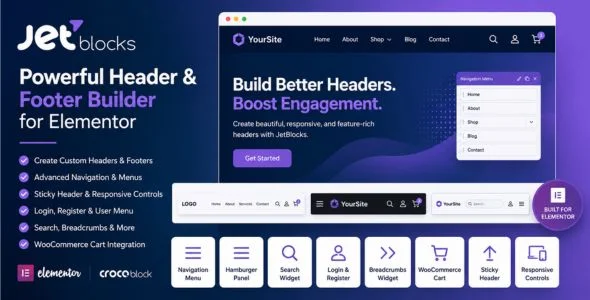
JetBlocks is a powerful header and footer plugin for Elementor developed by Crocoblock. It provides a collection of essential widgets and extensions that allow users to build highly customizable website headers and footers without writing code. Designed specifically for Elementor, JetBlocks helps create professional navigation areas, user authentication sections, sticky headers, search forms, breadcrumbs, shopping cart icons, and responsive menus.
Whether you’re building a business website, WooCommerce store, membership platform, blog, or portfolio, JetBlocks offers the flexibility needed to design attractive and functional website navigation experiences. With drag-and-drop widgets, extensive styling controls, and seamless Elementor integration, users can easily create modern headers that enhance usability and improve visitor engagement.
WooCommerce Cart Widget Show shopping cart icons, totals, and item counters.
Responsive Menu Controls Optimize navigation menus for desktops, tablets, and smartphones.
Custom Icons Support Choose custom icons for menus, search buttons, and toggles.
Dropdown Animation Effects Enhance navigation with smooth menu animations.
Popup Search Display Display search forms inside stylish popup windows.
Horizontal Menu Layouts Build traditional horizontal website navigation.
Vertical Menu Layouts Create sidebar and vertical menu structures.
Flexible Alignment Settings Adjust positioning and alignment for all navigation elements.
Typography Controls Customize fonts, sizes, weights, and text styling.
Advanced Color Styling Control colors for menus, buttons, backgrounds, and forms.
Spacing & Padding Settings Fine-tune margins, padding, and widget positioning.
Hover Effects Support Create engaging interactive menu hover states.
Elementor Native Integration Works seamlessly within the Elementor editor.
WooCommerce Compatibility Enhance online stores with shopping-focused header elements.
Mobile-Friendly Design Ensure perfect navigation experiences across all devices.
Performance Optimized Built with lightweight code for smooth website performance.
No Coding Required Design professional headers and navigation systems visually.
Drag-and-Drop Editing Customize every component using Elementor’s intuitive editor.
Professional Header Templates Build modern and conversion-focused website headers.
Regular Updates & Improvements Receive ongoing compatibility updates, new features, and enhancements.
Download JetBlocks WordPress Plugin
JetBlocks is an excellent solution for Elementor users who want complete control over website headers, footers, navigation systems, and user account sections. With powerful widgets, sticky header functionality, WooCommerce support, and responsive design tools, it provides everything needed to create polished and professional navigation experiences.
To Get Started
Log in to your WordPress dashboard.
Navigate to Plugins → Add New → Upload Plugin.
Upload the JetBlocks ZIP file.
Click Install Now and then Activate.
Open Elementor and start editing your header or footer templates.
Drag JetBlocks widgets into your layouts.
Customize styles, menus, and user account features.
Publish your templates and enhance your website navigation.
Build beautiful, responsive, and feature-rich website headers with JetBlocks—the complete header and footer toolkit for Elementor users.