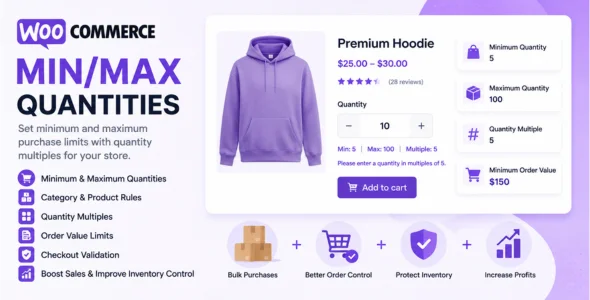
WooCommerce Min/Max Quantities is a powerful WooCommerce extension designed to control product purchase quantities, order limits, and category-based quantity restrictions. It helps store owners define minimum and maximum purchase requirements while ensuring customers buy products in specific quantity increments. This makes it an excellent solution for wholesale stores, bulk ordering businesses, manufacturers, distributors, and retailers that need greater control over inventory and order management.
The plugin allows merchants to set quantity rules at multiple levels, including individual products, product variations, categories, and entire orders. By enforcing quantity restrictions, store owners can prevent small unprofitable orders, reduce inventory issues, encourage bulk purchases, and maintain better stock control.
Designed to integrate seamlessly with WooCommerce, the extension works directly within the product management interface and checkout process. Customers automatically receive validation messages whenever quantity requirements are not met, ensuring a smooth shopping experience while enforcing store policies.
Features
- Minimum Product Quantity Rules
Set minimum quantities customers must purchase for individual products. - Maximum Product Quantity Limits
Restrict the maximum number of units customers can purchase. - Product Variation Quantity Rules
Apply quantity restrictions to specific product variations. - Category-Based Quantity Controls
Set minimum and maximum purchase quantities for product categories. - Order Quantity Restrictions
Control the minimum and maximum number of items allowed per order. - Minimum Order Value Requirements
Require customers to reach a specific order value before checkout. - Maximum Order Value Limits
Restrict the maximum value of customer orders. - Quantity Multiples Support
Force purchases in predefined multiples such as packs of 5, 10, or 20. - Bulk Purchase Enforcement
Encourage wholesale and bulk buying strategies. - Inventory Protection
Prevent customers from purchasing excessive stock quantities. - Stock Management Optimization
Help maintain balanced inventory levels and reduce stock issues. - Category Quantity Multiples
Require products within specific categories to be purchased in fixed increments. - Variation-Level Quantity Validation
Apply quantity rules to selected product variations. - Order Rule Exceptions
Exclude selected products from order-level restrictions. - Automatic Checkout Validation
Prevent checkout when quantity rules are not satisfied. - Custom Validation Messages
Display helpful notices explaining quantity requirements. - Wholesale Store Support
Ideal for B2B and wholesale WooCommerce websites. - Bulk Ordering Workflows
Support businesses that sell products in large quantities. - Flexible Quantity Configuration
Apply different rules across products and categories. - Improved Average Order Value
Encourage customers to purchase larger quantities. - Reduced Small Orders
Prevent low-value purchases that reduce profitability. - Customer-Friendly Quantity Controls
Guide customers toward valid purchase quantities. - Simple Product Compatibility
Works with standard WooCommerce products. - Variable Product Compatibility
Supports WooCommerce variable products. - Grouped Product Support
Manage quantity restrictions across grouped products. - WooCommerce Blocks Compatibility
Works with WooCommerce Cart and Checkout Blocks. - HPOS Compatibility
Compatible with High-Performance Order Storage. - Easy WooCommerce Integration
Configure rules directly within WooCommerce settings. - Performance Optimized
Designed to work efficiently with WooCommerce stores. - Regular Updates & Professional Support
Receive ongoing updates, improvements, and customer support.
Download WooCommerce Min/Max Quantities Plugin
WooCommerce Min/Max Quantities is an excellent solution for store owners who need greater control over purchasing behavior. Its flexible quantity restrictions, category-level rules, order limits, and quantity multiple functionality make it especially valuable for wholesale stores, distributors, manufacturers, and businesses that sell products in bulk.
To get started:
- Install and activate the WooCommerce Min/Max Quantities extension.
- Configure product-level quantity restrictions.
- Set category-based quantity rules.
- Define order minimums and maximums.
- Configure quantity multiples where required.
- Customize validation messages.
- Test the checkout process.
- Launch your optimized purchasing rules.
Improve inventory control, increase average order values, and enforce smarter purchasing rules with WooCommerce Min/Max Quantities.

Changelog: See What’s Fixed & Added
- Fixed max quantity validation when the product is already in the cart, preventing misleading add-to-cart success notices.
- Bumped WordPress tested up to version to 7.0.
- Bumped WooCommerce tested up to version to 10.9.
- Added read-only WordPress Abilities API support for Min/Max Quantities rules.
- Updated the JavaScript build toolchain to the React 18.3 line and added React 19 readiness guards.