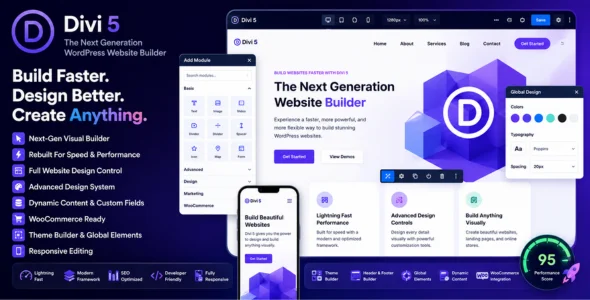
Divi 5 is the next-generation version of the popular Divi website builder and WordPress theme, designed to deliver faster performance, improved scalability, and a modern visual website-building experience. Built from the ground up with a redesigned framework, Divi 5 provides enhanced speed, smoother editing, advanced design flexibility, and improved stability for creating professional WordPress websites without coding knowledge.
Designed for businesses, agencies, freelancers, bloggers, online stores, and web designers, Divi 5 combines powerful drag-and-drop website building with an intuitive visual editing interface. Users can customize every aspect of their websites in real time, including layouts, typography, colors, animations, headers, footers, and dynamic content sections.
Divi 5 focuses heavily on performance optimization and modern development standards. The rebuilt architecture improves loading speeds, editor responsiveness, and overall website efficiency while maintaining compatibility with the extensive Divi ecosystem.
Whether you’re building business websites, landing pages, WooCommerce stores, portfolios, membership platforms, blogs, or client projects, Divi 5 provides a flexible and scalable foundation for creating professional websites with complete design control.
Detailed Documentation & Tutorials Includes setup guides, learning resources, and professional support materials.
Scalable Website Building Platform Suitable for freelancers, agencies, businesses, and enterprise-level projects.
Download Divi 5 WordPress Theme
Divi 5 is an excellent choice for users who want a fast, modern, and professional WordPress website builder with advanced customization capabilities and improved performance.
To get started:
Log in to your WordPress dashboard.
Go to Appearance > Themes > Add New > Upload Theme.
Upload the Divi Theme .zip file.
Click Install Now and then Activate.
Enable the Divi Builder and begin customizing your website.
Import layouts or create your own designs from scratch.
Build modern, responsive, and fully customizable WordPress websites with Divi 5 — perfect for agencies, freelancers, business owners, online stores, marketers, and designers who need advanced website-building flexibility with professional design control.
– Added new Grid Editor, enabling the visual creation of advanced grid layouts.
– Added support for number variables in the grid offset editor.
– Individual grid offset editor rules now support the full range of start, end, and span settings in a single rule.
– Fixed columns getting consolidated when switching the layout style from flex to grid when editing a row preset.
– Fixed grid offset rules not being copied to presets when creating new presets from current styles.
– Fixed minimum column width CSS not printing when set at the module level, when “equal minimum width columns” was set at the preset level.
– Fixed sections remaining hidden when section animation was enabled but duration and delay were stored as empty values.
– Fixed Theme Builder loops using the “current page” query on 404 pages incorrectly showing recent blog posts instead of the no-results state.
– Fixed Button Line Color and Button Line Style being unavailable when editing hover or sticky states after enabling underline on the normal state.
– Improved frontend font-family sanitization and archived global variable CSS output reliability.
– WooCommerce checkout pages built with Divi checkout modules now render one consistent checkout form instead of multiple competing checkout forms.
– Woo Product Gallery now exposes Design -> Image -> Sizing -> Column Class and keeps wrapped flex gallery item sizing aligned between the frontend and Visual Builder.
– Fixed an issue where nested Blurb modules could display the wrong icon in Visual Builder preview due to parent icon style leakage.
– Fixed ACF Color Picker dynamic content not displaying the correct text and decoration colors in the Visual Builder, so on-canvas styles now match the resolved colors shown on the live site.
– Internal test coverage only; no customer-facing changelog.
– Added Theme Builder Playwright smoke tests to the Builder 5 CI pipeline.
– Added a Playwright smoke test that verified the Theme Builder admin screen loads.
– Fixed the Layer view drop zone indicator and drag handle label being invisible in dark mode when dragging regular modules.
– Fixed an issue where module settings reset/default values could show module preset styles instead of the applied option group preset styles.
– Fixed an issue where custom button icons did not appear on the Contact Form 7 Styler module submit button in the Visual Builder and on the front end.
– Fixed Dropdown mega-menu positioning and sizing so floating menus can reliably align to parent row or viewport width across columns.
– Fixed frontend module order classes not starting at zero after layout migration.
– Imported legacy Text modules now preserve the expected Open Sans body weight during import so frontend rendering matches freshly created Text modules.
– Fixed an issue where Code Module curly-quote HTML entities rendered correctly in Visual Builder but not on the frontend.
– Fixed an issue where CTA modules with AnalyticsWP tracking enabled could enter backward compatibility mode after Divi 4 to Divi 5 migration.
– Fixed Visual Builder REST responses exposing Instagram tokens and accepting invalid Post Navigation post contexts.
– Improved performance of variable font weight inheritance.
– Fixed an issue where Video modules could fail to render YouTube videos when a video is added via Insert from URL in the media modal.