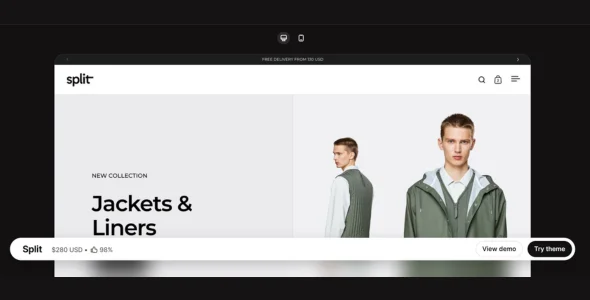
Split is a modern, visually striking, and highly customizable premium Shopify theme designed for brands that want to tell compelling visual stories while delivering an exceptional shopping experience. Created for fashion, lifestyle, furniture, home décor, beauty, and premium product stores, Split features a distinctive split-screen layout that captures attention and highlights products with bold imagery and elegant typography. Built with performance and flexibility in mind, it offers everything merchants need to launch a high-converting online store.
Designed for Shopify Online Store 2.0, Split provides intuitive drag-and-drop customization, flexible sections, and advanced merchandising tools without requiring coding knowledge. With multiple theme presets, conversion-focused shopping features, and responsive layouts, merchants can quickly create a unique storefront that performs beautifully across all devices.
Whether you’re launching a new brand or redesigning an existing Shopify store, Split combines elegant design, fast performance, and modern eCommerce features to create an engaging shopping experience.
Before & After Image Slider Compare products or demonstrate transformations interactively.
Lookbook Support Showcase collections and styled product combinations.
Product Videos Add engaging product demonstrations directly to product pages.
Image Hotspots Create interactive images that highlight featured products.
Shipping & Delivery Information Display shipping details and delivery information on product pages.
Size Chart Support Help customers choose the correct size with dedicated sizing guides.
Animation Effects Add smooth transitions and interactive animations for a premium browsing experience.
Responsive & Mobile-Friendly Design Fully optimized for desktops, tablets, and smartphones.
SEO & Performance Optimized Built for fast loading speeds and improved search engine visibility.
Right-to-Left (RTL) Support Compatible with RTL languages for global audiences.
Multi-Language Ready Supports multiple languages to help merchants reach international customers.
Regular Updates & Professional Support Receive ongoing feature improvements, compatibility updates, documentation, and dedicated customer support.
Download Split Shopify Theme
Split is an excellent choice for premium brands, fashion stores, furniture retailers, lifestyle businesses, beauty brands, and creative merchants looking for a unique Shopify theme with modern design and powerful eCommerce features.
To get started:
Log in to your Shopify Admin.
Go to Online Store > Themes.
Upload the Split Theme.zip file.
Click Publish to activate the theme.
Customize your storefront using the Shopify Theme Editor.
Add your products, collections, and branding to launch your online store.
Build visually engaging and conversion-focused Shopify stores with Split Theme—perfect for brands that want outstanding design, flexible customization, and a premium shopping experience.